Paper Cut Valentine Gift Box SVG Bundle: A Guide to Flawless Crafting
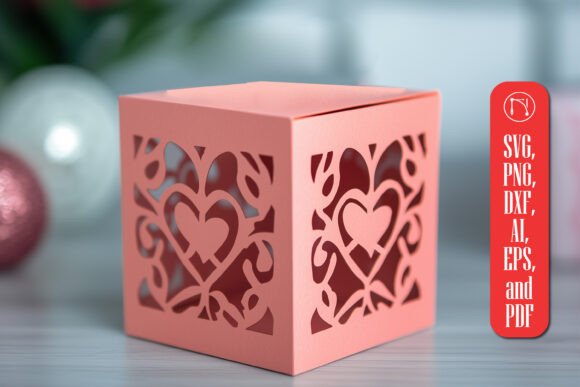
Creating a handmade gift often feels like the ultimate expression of care, but the difference between a memorable keepsake and a frustrating project frequently comes down to the quality of your digital files. The Paper Cut Valentine Gift Box SVG Bundle is designed to bridge that gap, offering intricate heart patterns and a precise foldable structure for crafters using machines like Cricut or Silhouette. However, simply downloading a file does not guarantee a perfect result. Many creators overlook critical details regarding material selection, software settings, and design compatibility, leading to wasted materials and missed deadlines. Understanding these nuances ensures your final product is as elegant and heartfelt as intended.
Understanding the Value of Precision Files
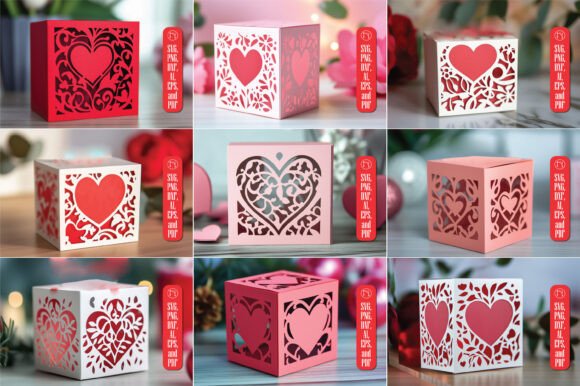
The appeal of this bundle lies in its ability to transform flat paper into a three-dimensional container capable of holding jewelry, small treats, or love notes. Unlike generic templates found on free sites, a dedicated bundle typically includes multiple formats—SVG, PNG, DXF, AI, EPS, and PDF—to ensure compatibility across various cutting machines and software platforms. This versatility is essential for both hobbyists and small business owners who need reliable assets for consistent production. When you choose a high-quality bundle, you are investing in a design where every curve and cut line has been tested for structural integrity.
However, the value of the file is only realized if it is used correctly. A common misunderstanding is assuming that all "SVG" files function identically. In reality, the complexity of the vector paths can vary significantly. Intricate designs, such as the delicate heart patterns featured in this box, require specific machine capabilities and blade types. If the file is not optimized for your specific device, you may encounter jagged edges or incomplete cuts, which can ruin the aesthetic of the gift before you even begin assembly.
Common Pitfalls in File Selection and Setup
One of the most frequent mistakes crafters make is neglecting to verify the file format against their software version. While the bundle offers multiple formats, selecting the wrong one for your workflow can lead to scaling issues or lost layers. For instance, opening an older DXF file in the latest version of design software might result in distorted geometry. Similarly, beginners often download the PNG version intending to cut it, unaware that raster images cannot be traced by cutting machines without additional steps that compromise precision. Always prioritize the vector formats (SVG, DXF, AI) for cutting tasks to maintain the sharpness of the intricate details.
Another overlooked detail is the assumption that the included instructions cover every possible scenario. Most bundles provide a general guide, but they rarely account for the specific thickness or texture of the cardstock you have chosen. Using standard printer paper for a structural box like this will result in a flimsy product that collapses under the weight of its contents. Conversely, using cardstock that is too thick without adjusting your blade depth and pressure settings can cause the machine to skip lines or damage the mat. These errors directly impact the usability and presentation of your final gift, turning a potential masterpiece into a disposable item.
Material Mismatches and Structural Failures
The choice of material is just as critical as the digital file itself. A common error is selecting a paper type that looks beautiful but lacks the necessary stiffness for folding. The foldable structure of the Paper Cut Valentine Gift Box relies on clean creases and rigid panels. If the paper bends too easily, the box will lose its shape immediately upon handling. Furthermore, some decorative papers have coatings that interfere with adhesive application, causing tabs to peel away during assembly. To avoid this, test your material on a small scrap piece before committing to the full design. Look for acid-free cardstock with a weight between 65 lb and 80 lb, which offers the ideal balance of flexibility for folding and rigidity for structure.
Optimizing Your Cutting Process
Even with the right file and material, improper machine settings can derail your project. Many users default to the "Cardstock" setting in their machine's software without considering the intricacy of the design. The delicate heart patterns in this bundle require a slower cutting speed and potentially a deeper blade setting than a simple silhouette would. Rushing the process often leads to the blade dragging through the paper rather than slicing cleanly, resulting in frayed edges that diminish the elegance of the gift. Take the time to run a test cut on a corner of your material to fine-tune these variables.
Additionally, registration marks are vital when working with multi-layered or double-sided projects. If you plan to print the design on one side and cut on the other, misalignment can occur if the print head and cutter are not calibrated. Ensure your printer is set to "Actual Size" or "100% Scale" rather than "Fit to Page," as automatic resizing can distort the dimensions of the box, making the tabs too short or the panels uneven. This attention to detail ensures that the box folds together seamlessly, creating a professional finish that reflects the effort you put into the gift.
Evaluating Quality Before You Buy
Before purchasing any digital asset, it is wise to evaluate the seller's reputation and the specific features of the bundle. Not all SVG bundles are created equal; some contain low-resolution vectors that look pixelated when scaled up. Check the preview images closely for smooth curves and clean lines. Read reviews from other crafters to see if they mention issues with missing layers or difficult assembly. A reputable bundle should include clear documentation and customer support in case you encounter technical hurdles.
Consider your long-term needs as well. If you plan to sell these boxes at craft fairs or online, ensure the license allows for commercial use. Using a personal-use-only file for profit can lead to legal complications and financial loss. By choosing a bundle that explicitly grants commercial rights, you protect your business interests while gaining access to a versatile tool for your creative endeavors. Remember, the goal is to create a memorable keepsake that expresses love creatively, and the foundation of that success lies in making informed decisions about your tools and materials.
Practical Steps for Success
To maximize the potential of the Paper Cut Valentine Gift Box SVG Bundle, follow these practical steps:
- Verify Compatibility: Confirm that your cutting machine supports the specific file formats provided, prioritizing SVG or DXF for best results.
- Select the Right Paper: Choose cardstock with appropriate weight and texture to ensure structural integrity and clean folds.
- Run Test Cuts: Always perform a test cut on scrap material to adjust blade depth, pressure, and speed settings before cutting your final piece.
- Check Scaling Settings: Ensure your printer and cutting software are set to 100% scale to prevent dimensional errors.
- Review Licensing: Confirm the usage rights match your intended purpose, whether for personal gifts or commercial sale.
By approaching your project with these precautions, you avoid the frustration of failed cuts and weak structures. Instead, you focus on the joy of creation, assembling a gift that is not only visually stunning but also built to last. The effort you invest in getting the details right pays off in the satisfaction of giving something truly unique and handmade.