Celestial Harmony Tile STL: A Guide to Perfecting Your Cosmic Creations
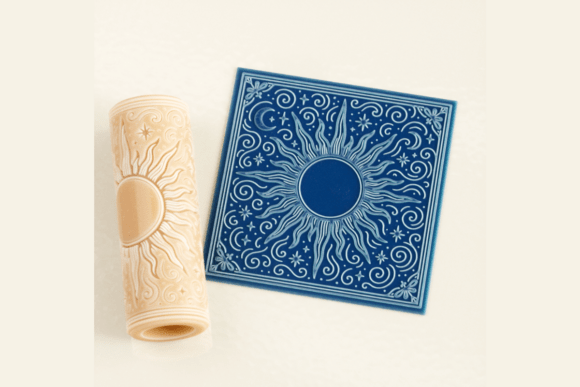
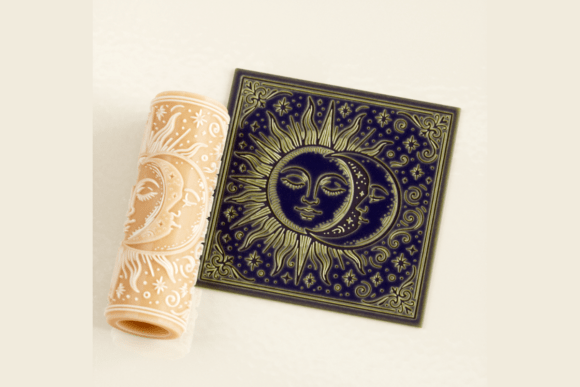
The allure of the cosmos has long captivated artists, from ancient potters to modern confectioners. When you discover a design that perfectly captures the duality of the sun and moon in alignment, surrounded by a field of stars, it is natural to want to bring that celestial beauty into your work. The Celestial Harmony Tile STL offers exactly this: a high-resolution digital model designed to transfer mystical patterns onto clay, fondant, and various craft materials. However, possessing the file is only the first step. Many creators overlook the nuances of how to best utilize this specific texture roller, leading to wasted material, poor print quality, or designs that lack the intended depth.
Whether you are a professional baker preparing for an esoteric wedding or a polymer clay artisan crafting jewelry that symbolizes balance, understanding the workflow is crucial. This guide moves beyond simple instructions to address common pitfalls and offer practical strategies for achieving professional results with your digital download.
Understanding the Digital Nature of Your Purchase
A frequent source of frustration for new 3D printing users is the expectation of receiving a physical object immediately after purchase. It is vital to remember that the Celestial Harmony Tile STL is a digital product. No physical item will be shipped. You are purchasing a blueprint—a set of coordinates optimized for FDM, SLA, DLP, and resin printers—that you must realize yourself.
This distinction matters because it places the responsibility of quality control on the maker. If the final roller does not perform as expected, the issue often lies in the printing process rather than the design itself. Before you begin slicing your file, verify that your printer is calibrated. For a texture roller with fine details like starbursts and facial features of the sun and moon, layer height is critical. While the file supports a range of settings, aiming for a layer height between 0.1 mm and 0.15 mm is essential to capture the intricate cosmic patterns without losing definition.
Common Mistakes in Printing and Preparation
One of the most overlooked details when working with high-resolution texture files is the assumption that "no supports required" means "no preparation needed." While the Celestial Harmony Tile STL is engineered to minimize support structures, skipping bed adhesion checks can lead to warping. If the base of your roller lifts during printing, the texture pattern will become distorted, rendering the tool useless for precise embossing.
Practical Advice: Always ensure your build plate is level and clean. For resin printers (SLA/DLP), use a fresh vat of resin and ensure the FEP film is free of scratches, as these can create artifacts on the surface of your roller. For FDM printers, consider using a brim if you notice the edges lifting. A warped roller will crush your clay unevenly or tear delicate fondant, ruining hours of work.
Another common error involves resizing the model too aggressively. The file description notes that it is high resolution and can be resized, but there is a limit. If you scale the design down too small, the stars and the union of the sun and moon faces may merge into a single blob, losing the symbolic duality that makes the design special. Conversely, scaling it too large can introduce gaps between layers that feel rough to the touch.
- Check your slicer preview: Zoom in on the sliced layers before printing. If the details look pixelated or disconnected, reduce the scale slightly or adjust your infill density.
- Test prints: If you have access to a smaller format, print a test patch of the texture first to gauge detail retention before committing to a full-sized roller.
Material-Specific Application Challenges
Once printed, the roller is ready for use, but applying it incorrectly across different mediums can still yield disappointing results. The versatility of the Celestial Harmony Tile Texture Roller allows it to work with polymer clay, sugar paste, and even large cookies, yet each material reacts differently to pressure and friction.
For Polymer Clay Jewelry: Beginners often press too hard when creating symbolic pieces representing astrology or duality. Excessive force can cause the clay to stick to the roller, pulling up the delicate star patterns. Instead, apply firm but gentle pressure. Roll over the clay once or twice at most. If the clay sticks, lightly dust the roller with cornstarch or talc, ensuring no residue remains on the face of the sun or moon.
For Baking and Confectionery: When embossing fondant or sugar paste for celestial-themed weddings, moisture content is the enemy. If your fondant is too soft, the fine lines of the cosmic patterns will blur. If it is too dry, it may crack under the pressure of the roller. Knead your fondant until it reaches a pliable, dough-like consistency before rolling. Additionally, always sanitize your 3D printed roller thoroughly before food contact. Even though the PLA or resin used is generally safe, post-processing with a food-safe sealant or coating is recommended for direct food applications to prevent bacterial growth in microscopic crevices.
Evaluating Quality and Long-Term Use
As you integrate this tool into your creative projects, such as making decorative tiles, coasters, or relief panels with a gothic flair, durability becomes a concern. 3D printed rollers are durable but not indestructible. A common mistake is storing the roller loosely in a drawer where it can get scratched or bent. Scratches on the roller will translate directly into your finished work, marring the perfect alignment of the sun and moon.
To maintain the integrity of your Celestial Harmony Tile STL creation:
- Store Properly: Keep the roller in a protective sleeve or a dedicated case away from direct sunlight, which can degrade certain resins or plastics over time.
- Clean Gently: After use, wipe the roller with a soft, damp cloth. Avoid harsh chemicals or abrasive brushes that could wear down the high-resolution details.
- Inspect Regularly: Before starting a new batch of cookies or clay pieces, run your finger over the texture. If you feel any burrs or rough spots from the printing process, sand them down gently with fine-grit sandpaper.
By anticipating these challenges, you shift from simply owning a file to mastering a craft tool. The Celestial Harmony Tile STL is more than just a download; it is a bridge between digital design and tangible art. Whether you are exploring the mysteries of the zodiac or adding a touch of cosmic wonder to a birthday cake, taking the time to print correctly and apply the texture with care ensures that your final creations reflect the timeless charm and balance intended by the design. Avoid the rush, respect the material properties, and let the stars shine through your work with clarity and precision.