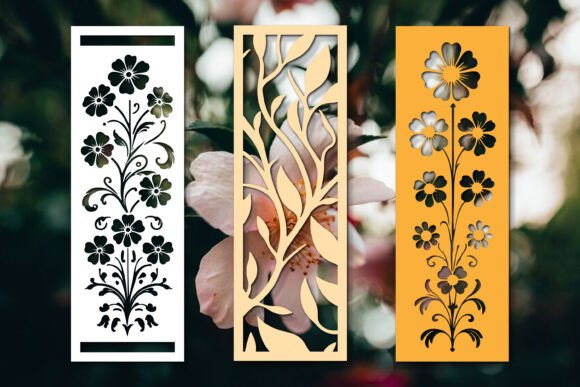
Paper Cut Floral Bookmarks SVG: A Guide to Precision and Elegance
There is a distinct charm in the tactile experience of paper crafting, particularly when it involves intricate layering that transforms flat sheets into dimensional art. The Paper Cut Floral Bookmarks SVG design represents more than just a digital file; it is a blueprint for creating sophisticated, handcrafted accessories that elevate any reading session or gift presentation. For creators ranging from hobbyists to small business owners, these designs offer a pathway to professional-looking results without the need for complex drawing skills. However, the journey from a digital download to a finished physical product requires attention to detail. Understanding the nuances of file formats, machine settings, and assembly techniques is what separates a frustrating project from a stunning piece of decor.
Understanding the Value of Multi-Layered Designs
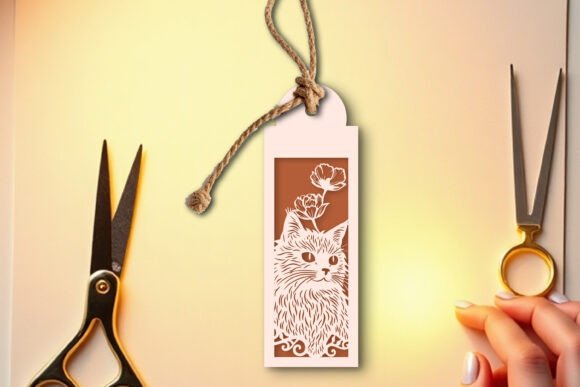
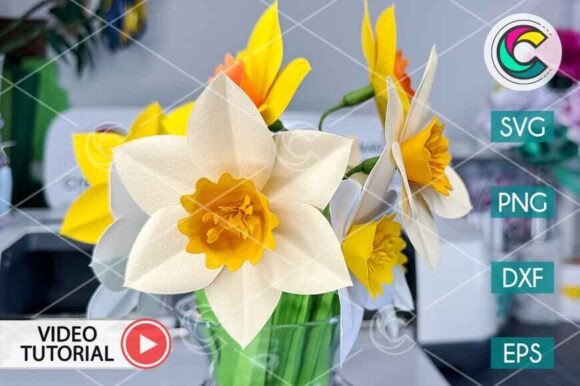
When you encounter a Paper Cut Floral Bookmarks SVG, you are looking at a vector-based design intended for precision cutting machines like Cricut or Silhouette. Unlike simple single-layer cutouts, these floral designs rely on depth. Each petal, leaf, and stem is often separated into its own layer to create a 3D effect once assembled. This approach allows light to play through the gaps, highlighting the texture of the paper and the intricacy of the floral arrangement. People are drawn to these designs because they bridge the gap between mass-produced items and bespoke artisanal work. They are ideal for book clubs, wedding favors, teacher gifts, or even as standalone wall art.
The appeal lies in the versatility. You can swap out cardstock colors to match seasonal themes, use metallic papers for luxury events, or incorporate patterned scrapbook paper for a whimsical touch. Yet, the complexity of the design means that preparation is key. Rushing the process or overlooking the specific requirements of the file structure can lead to wasted materials and time.
Common Pitfalls in File Selection and Preparation
One of the most frequent misunderstandings among beginners concerns the file formats included in the download package. When purchasing a Paper Cut Floral Bookmarks SVG, you will typically receive a ZIP file containing various formats: AI, EPS, SVG, JPG, PNG, DXF, and DWG. It is crucial not to simply open the first file you see. Using a raster image (JPG or PNG) instead of a vector file (SVG, DXF, or AI) will result in jagged edges and poor cut quality. Raster images are made of pixels, while vector files are mathematical paths that your cutting machine interprets perfectly regardless of size.
Another common mistake is failing to extract the ZIP archive correctly. Many users attempt to upload the compressed folder directly into their cutting software, which leads to errors or missing layers. Always unzip the file to your computer's desktop or a dedicated folder first. Inside, you will find the individual files necessary for different software ecosystems. If you use Cricut Design Space, the SVG is usually your best friend. For Silhouette Studio, you might prefer the DXF or SVG depending on your version. Ignoring this step can cause the software to fail to recognize the design elements, leaving you with incomplete cuts.
Optimizing Your Cutting Process
Once the files are prepared, the next hurdle is the actual cutting process. A significant error here is assuming that all paper types require the same blade pressure and speed. Floral bookmarks often feature delicate tendrils and thin stems. If the blade pressure is too high, you risk cutting through the backing mat or crushing the fine details of the paper. Conversely, if the pressure is too low, the machine may struggle to slice through thicker cardstock, resulting in uncut sections that ruin the aesthetic.
To avoid this, always perform a test cut on a scrap piece of the exact paper you intend to use. Adjust the "Pressure" and "Speed" settings in your machine's software until you achieve a clean separation without tearing. Additionally, ensure your cutting mat has strong adhesive. Over time, mats lose their grip, causing the paper to shift during the cut. A shifting sheet can misalign the layers, making the final stacking impossible. Replacing an old mat or cleaning it with a lint roller before starting can save hours of frustration.
The Art of Assembly and Layering
The true magic of the Paper Cut Floral Bookmarks SVG happens during assembly. The instructions provided in the download often include a serial number system to guide the stacking order. A common oversight is ignoring these numbers or assuming the visual appearance dictates the order. In layered paper crafts, the sequence determines how the shadows fall and how the dimensions pop. Placing a large background layer on top of a delicate foreground flower will flatten the design and obscure the details you worked hard to cut.
Adhesive application is another area where mistakes frequently occur. Using too much glue can cause the paper to warp or bleed through, ruining the clean lines of the floral motif. Too little glue, and the layers will separate over time. The best approach is to use a fine-tip glue pen or double-sided tape specifically designed for cardstock. Apply the adhesive only to the edges or specific anchor points of the lower layers, ensuring the upper layers remain pristine. Patience is essential here; allow each layer to set slightly before adding the next to prevent smudging.
Evaluating Quality Before You Begin
Before committing to a full batch of bookmarks, it is wise to evaluate the design files themselves. Check the preview images to ensure the line weights are appropriate for your chosen paper thickness. Some designs may have lines that are too close together for standard cardstock, leading to tears when cutting. If the design seems overly dense, consider using a thinner paper stock or simplifying the color palette to reduce the number of layers needed.
Furthermore, verify that the file includes all necessary components. A complete package should contain every element required to build the bookmark, including the base strip and all decorative floral pieces. Missing layers can halt your project mid-way. By taking the time to review the contents of the ZIP file—specifically the AI, EPS, SVG, JPG, PNG, DXF, and DWG options—you ensure compatibility with your workflow and prevent last-minute scrambling for replacements.
Maximizing Efficiency and Creativity
For those looking to scale up, such as entrepreneurs preparing for craft fairs or educators making classroom supplies, efficiency becomes paramount. Instead of cutting one bookmark at a time, utilize the nesting features in your software to arrange multiple copies of the design on a single sheet of paper. This reduces waste and speeds up production. Remember that the Paper Cut Floral Bookmarks SVG is scalable; you can resize the design to fit different paper sizes without losing quality, offering flexibility in your planning.
Don't be afraid to experiment with mixed media. While traditional cardstock is the standard, combining vellum overlays or textured papers can add a unique dimension to the floral theme. The vector nature of the files supports these creative deviations. By understanding the technical requirements and respecting the assembly process, you transform a simple digital download into a tangible masterpiece. Whether you are crafting for personal joy or commercial gain, the attention to detail in selecting, cutting, and assembling these floral bookmarks ensures a result that is both beautiful and durable.