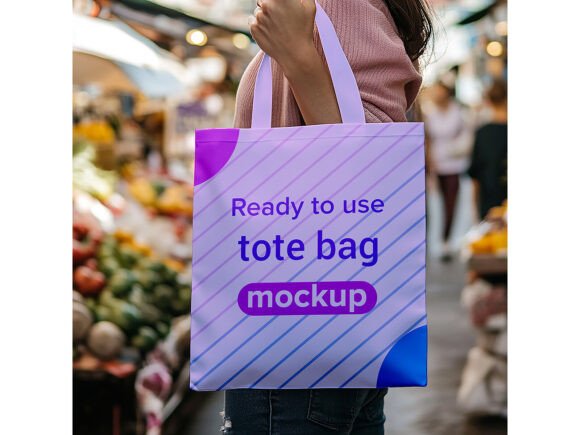
Street Market Tote Bag Mockup
In the world of visual branding, the gap between a flat digital file and a tangible product can feel wide. Clients often struggle to visualize how a logo will sit on fabric, or how a pattern interacts with the folds of a canvas bag. This is where a high-quality presentation tool becomes essential. The Street Market Tote Bag Mockup bridges that gap effectively. It transforms a simple JPEG into a lifelike representation of your design in a real-world setting, offering the depth, texture, and lighting needed to sell an idea.
This specific mockup is designed for efficiency without sacrificing realism. By utilizing Smart Object layers, it allows designers to insert their artwork instantly. The result is a seamless integration where your design adapts to the perspective and curvature of the bag. Shadows soften naturally around the edges, and the lighting mimics the ambient glow of a bustling street market. For professionals who need to present work quickly but convincingly, this tool removes the technical barriers usually associated with 3D rendering.
Why Realism Matters in Brand Presentation
When presenting a new brand identity or a merchandise line, context is everything. A logo displayed on a white background tells you about the shape and color, but it fails to communicate weight, texture, or usability. The Street Market Tote Bag Mockup provides that necessary context. It places the design in an environment that suggests movement and utility.
Consider the psychology of the viewer. When a potential client sees a tote bag resting on a wooden crate or a stone surface, surrounded by soft, natural light, they subconsciously begin to imagine holding it. They can feel the roughness of the canvas and the sturdiness of the handles. This emotional connection is crucial for closing sales. Whether you are pitching to a local coffee shop looking for promotional bags or showcasing a limited edition print run, the realistic shadows and lighting effects included in this PSD file do the heavy lifting for you.
The high resolution of the file ensures that every detail remains crisp. At 300 DPI, the textures of the fabric and the grain of the background are preserved even when viewed up close. This level of detail is non-negotiable for professional portfolios. It signals to the audience that you care about quality and precision, traits that translate directly to trust in your design services.
Streamlining Your Workflow with Smart Objects
One of the most significant advantages of this resource is its ease of use. In the past, creating realistic mockups required complex 3D modeling software or hours of manual masking and blending. Today, the workflow is streamlined through the use of Smart Objects. You simply open the PSD file in Photoshop, double-click the designated layer, paste your design, save, and the main document updates automatically.
This process is accessible to users of all skill levels. You do not need to be a master of layer masks or advanced blending modes to achieve professional results. The Smart Object Replacement feature ensures that your design is mapped correctly to the geometry of the bag. It handles the distortion and perspective adjustments for you, maintaining the integrity of your artwork while fitting it perfectly onto the tote.
For freelancers and small business owners managing multiple projects, time is a critical resource. The ability to generate a polished presentation in minutes rather than hours allows you to focus on what matters most: the creativity of the design itself. The file is fully layered and organized into folders, making navigation intuitive. You can tweak lighting, adjust the background, or modify the angle if the template supports those variations, giving you flexibility within a structured framework.
Creative Applications Across Industries
The versatility of the Street Market Tote Bag Mockup extends far beyond simple logo placement. It serves as a canvas for various creative interpretations and project types. Here are several ways different professionals can adapt this tool for their specific goals:
- Eco-Friendly Branding: With the rise of sustainability, reusable tote bags have become a staple for eco-conscious brands. Use this mockup to showcase organic cotton designs, minimalist typography, or earthy color palettes that align with green initiatives. The natural lighting of the street market setting complements these themes perfectly.
- Event Merchandise: Music festivals, art fairs, and conferences rely heavily on branded swag. Present your event's merchandise lineup using this mockup to give attendees a preview of what they can expect. Show off limited edition prints or collaborative artist designs in a way that feels exclusive and desirable.
- Print-on-Demand Stores: Entrepreneurs running online stores need compelling product images to drive conversions. Instead of relying on generic manufacturer photos, customize your listings with unique mockups that reflect your brand's aesthetic. This helps your products stand out in crowded marketplaces like Etsy or Shopify.
- Portfolio Building: Design students and junior creatives often lack physical samples of their work. Using this mockup allows them to populate their portfolios with diverse case studies. It demonstrates an understanding of how graphics translate to physical media, a key skill employers look for.
Tailoring the Look for Different Audiences
While the core structure of the mockup remains consistent, the way you utilize it can change based on your target audience. If you are presenting to a corporate client, you might opt for a cleaner, more subdued design on the bag to convey professionalism. Conversely, for a youth-oriented fashion brand, bold patterns and vibrant colors might be more appropriate.
The Street Market Tote Bag Mockup allows for these variations because the Smart Object layer accepts any type of image file. You can overlay complex illustrations, photorealistic textures, or intricate vector art. The key is to ensure that your design respects the natural folds of the fabric. While the software handles the perspective, keeping your artwork balanced within the safe zone of the bag prevents elements from getting cut off or distorted unnaturally.
Consistency is also vital when building a brand identity. If you are creating a series of images for a campaign, ensure that the lighting and angle remain uniform across all mockups. Since this pack includes a single high-quality PSD, you can duplicate the file and swap out designs while maintaining the exact same environmental conditions. This creates a cohesive visual narrative that strengthens your brand message.
Practical Tips for Best Results
To get the most out of this resource, keep a few practical recommendations in mind. First, always prepare your design files at a high resolution before inserting them into the Smart Object. Low-resolution images may appear pixelated once scaled to fit the bag, undermining the realism of the mockup.
Second, pay attention to the contrast of your design against the bag's base color. The mockup features realistic shadows and highlights; ensure your artwork has enough dynamic range to interact with these lighting effects. If your design is too dark, it might get lost in the shadows. If it is too bright, it could clash with the ambient light. Adjusting the opacity or blend mode of your inserted layer slightly can sometimes help integrate it more naturally.
Finally, remember that the goal is to enhance your design, not distract from it. The background of the street market setting adds character, but it should support the subject—the tote bag. If the background feels too busy, consider using the adjustment layers provided in the organized folder structure to mute the tones or shift the focus back to your product.
Conclusion
The Street Market Tote Bag Mockup is more than just a template; it is a strategic asset for anyone looking to elevate their visual communication. By combining high-quality 3D realism with user-friendly editing capabilities, it empowers creators to present their work with confidence and style. Whether you are launching a new product line, pitching to a client, or simply organizing your portfolio, this tool offers the clarity and impact needed to make a lasting impression.
With instant download access and no requirement for advanced technical skills, it democratizes professional-grade presentation. It invites you to focus on the creative possibilities of your design while handling the technical execution seamlessly. As you explore the endless applications of this mockup, remember that the best presentations are those that tell a story—one where your design takes center stage in a believable, engaging world.