Realistic Certificate Frame Mockup Guide
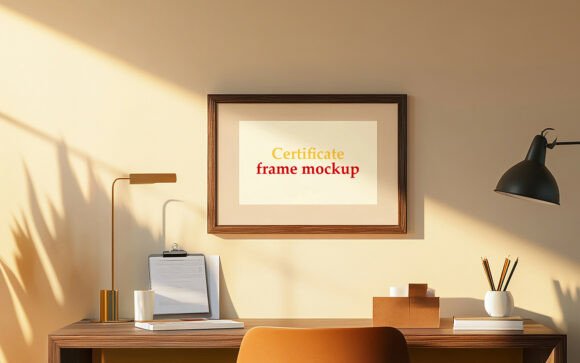
In the world of digital design, the gap between a flat vector file and a tangible, professional presentation can be the difference between a client saying "yes" or walking away. This is where a Realistic Certificate Frame Mockup becomes an indispensable tool in your creative arsenal. Whether you are a graphic designer pitching to a corporate board, an educator preparing graduation materials, or a freelancer showcasing your branding work, the ability to visualize your design in a lifelike context is crucial. This specific high-quality PSD mockup solves a common problem: how to present a certificate design with depth, texture, and realism without needing expensive photography equipment or advanced 3D rendering skills.
The Power of Context in Design Presentation
When you hand over a certificate design as a simple JPG or PNG, the viewer often struggles to imagine its physical scale, weight, and finish. A Realistic Certificate Frame Mockup bridges this cognitive gap instantly. By placing your artwork into a pre-rendered environment that mimics real-world lighting, shadows, and material textures, you provide immediate context. The human brain processes visual information faster than text; seeing your logo or typography resting within a wooden frame, casting a soft shadow on a wall, triggers an emotional response associated with prestige and completion.
This isn't just about making things look pretty. It is about communication. In professional branding, the perceived value of a service is often tied to the quality of its deliverables. A certificate for a certification course, an award, or a diploma looks significantly more authoritative when presented in a realistic setting. The mockup enhances the perception of your work, suggesting that the final product will be equally polished and professional.
Key Features That Drive Efficiency
The primary strength of this particular Realistic Certificate Frame Mockup lies in its user-friendly architecture. Designed for speed and precision, it leverages the power of Smart Objects within Photoshop. This means you do not need to manually warp, distort, or blend your images to fit the perspective of the frame. The process is streamlined:
- Smart Object Replacement: Simply double-click the designated layer, paste your design, save, and watch it automatically conform to the frame's geometry.
- Automatic Lighting and Shadows: The mockup calculates reflections and shadows based on your inserted image, ensuring seamless integration without manual adjustment.
- Fully Layered Organization: With layers neatly organized in folders, navigating the file is intuitive, allowing you to tweak background colors or frame positions if needed.
- No Skill Barrier: You do not need to be a master of Photoshop filters or blending modes. If you can open a PSD file, you can use this tool effectively.
These features translate directly into productivity. For a busy entrepreneur or a marketing agency handling multiple projects, saving even fifteen minutes per project adds up to hours of reclaimed time over a month. The "Instant Download" capability ensures you can start presenting immediately, while the 300 DPI resolution guarantees that your output remains crisp whether viewed on a high-resolution monitor or printed for a physical portfolio.
Practical Applications Across Industries
The versatility of a Realistic Certificate Frame Mockup extends far beyond a single industry. Its applications are vast, catering to a diverse audience ranging from hobbyists to enterprise-level businesses.
For Educators and Institutions
Schools, universities, and training centers rely heavily on certificates to validate achievement. Before printing thousands of diplomas, administrators need to approve the layout. Using this mockup allows them to see exactly how the seal, signatures, and student names will appear on the final framed product. It helps in decision-making regarding paper texture, border styles, and overall aesthetic before committing to production costs.
For Corporate Branding and HR
Human Resources departments frequently issue awards for employee of the month, safety milestones, or long-term service. Presenting these designs in a realistic frame during internal meetings or company newsletters elevates the recognition. It signals to employees that their achievements are valued and treated with the utmost respect. Furthermore, when creating sales enablement materials, showing a framed certificate of partnership or accreditation adds a layer of trustworthiness to your business proposition.
For Freelancers and Creative Agencies
Freelancers often compete in saturated markets. Your portfolio needs to stand out. Instead of showing a grid of flat files, using a Realistic Certificate Frame Mockup transforms your case studies into lifestyle imagery. Imagine a web developer showcasing a "Certified Partner" badge for a client, or a branding consultant displaying a new company's incorporation documents in a sleek frame. It tells a story of success and professionalism that a flat image simply cannot convey.
Digital and Social Media Engagement
In the digital realm, engagement is king. When sharing announcements on LinkedIn, Instagram, or Facebook, static images often get scrolled past. A certificate presented in a realistic frame draws the eye. The depth and lighting create a focal point that stops the scroll. Whether you are announcing a personal certification, a business milestone, or a new course launch, the visual impact of the mockup increases the likelihood of likes, shares, and comments.
Evaluating Quality and Usability
Not all mockups are created equal. When selecting a tool like this Realistic Certificate Frame Mockup, there are practical considerations to keep in mind to ensure it meets your standards.
First, check the resolution. Low-resolution mockups can appear pixelated when zoomed in or printed. This pack includes a 300 DPI file, which is the industry standard for print-ready graphics. This ensures that no matter how large you display the image, the details remain sharp.
Second, consider the editability. Some mockups are "baked in," meaning you cannot change the angle or the lighting once the image is set. This specific PSD is 100% Editable. The layers are well-organized, allowing you to adjust the background environment or the frame color to match your brand guidelines. This flexibility is essential for maintaining brand consistency across different presentations.
Finally, assess the learning curve. A powerful tool is useless if it is too difficult to operate. The inclusion of Smart Objects makes this mockup accessible to beginners while still offering enough depth for advanced users who want to tweak specific lighting effects. The fact that it comes with both a PSD (for editing) and a JPG (for quick previews) offers the best of both worlds.
Maximizing Your Workflow
To get the most out of this Realistic Certificate Frame Mockup, integrate it early in your design process. Don't wait until the final proofing stage to see how your design looks in context. Use it during the concept phase to test different typography pairings or color schemes against the frame's texture. This proactive approach can prevent costly revisions later on.
Additionally, maintain a library of such assets. While this specific frame is excellent for formal certificates, having a collection of similar high-quality PSDs allows you to adapt quickly to various client requests. Whether the client wants a rustic wood finish or a modern metallic look, having a reliable workflow for inserting designs saves mental energy and keeps your creative momentum going.
Ultimately, the goal of any design asset is to facilitate better communication. A Realistic Certificate Frame Mockup does more than just display an image; it sells a vision. It turns a digital file into a tangible promise of quality. By leveraging the strengths of this tool—its ease of use, high resolution, and photorealistic rendering—you elevate your professional standing and ensure your hard work receives the attention it deserves.